


Top 10 non-stop running game apps for iOS and Android
Sitting
at the metro station or a bus stop perhaps with nothing to do but stare
at people walking by? Or a coffee shop maybe, waiting for someone,
perhaps stuck at that one clue trying to solve a mundane crossword? If
you're the proud owner of an iOS or Android device, you should be making
the most of it. Casual gaming apps are gaining popularity on both these
platforms that not just keep you engaged but offer a whole new level of
fun.
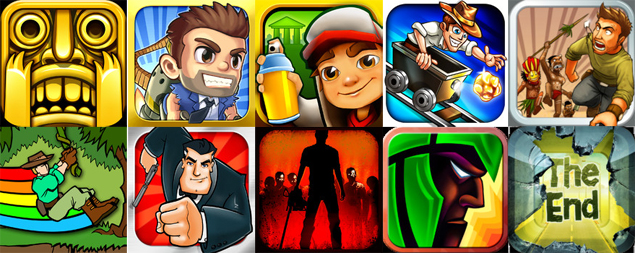
A more recent category of gaming apps pertaining to non-stop running is catching up fast with games like Temple Run and Jetpack Joyride offering various levels of challenges without compromising on the fun factor. We have put together a list of 10 such endless running game apps that are challenging, addictive and extremely fun. Let's get you running!
1. Temple Run
Developer Imangi Studios had thought this out well from the beginning. Right from day one, Temple Run has been a huge hit amongst the masses for its simple gameplay, missions and the one motive that keeps you hooked: keep running. Your reflexes are put to the ultimate test as you navigate through cliffs and ruins by sliding, jumping, turning and tilting. Collect coins to unlock various character, abilities and power ups that can be put to good use during the game. The iOS app offers social integration with Facebook, Twitter and even lets you Message, Mail or save your scores to camera roll.
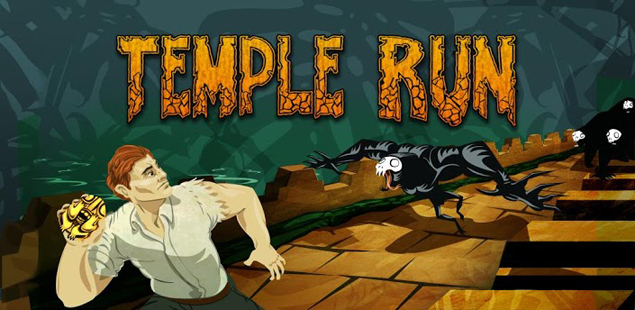 The
game's popularity knew no leaps and bounds and Imangi cashed in on the
opportunity to release two spin-offs in association with Disney namely
Temple Run: Brave and the more recent Temple Run: Oz along with a
recently introduced sequel to the original hit. Temple Run 2 offers tons
of new gameplay features and story lines offering more diverse and
stunning environments with the introduction of new traps and hurdles
along the way. The game now also has new characters, more power-ups,
special achievements, better gameplay graphics and this time round a
bigger monkey chasing you down the structures.
The
game's popularity knew no leaps and bounds and Imangi cashed in on the
opportunity to release two spin-offs in association with Disney namely
Temple Run: Brave and the more recent Temple Run: Oz along with a
recently introduced sequel to the original hit. Temple Run 2 offers tons
of new gameplay features and story lines offering more diverse and
stunning environments with the introduction of new traps and hurdles
along the way. The game now also has new characters, more power-ups,
special achievements, better gameplay graphics and this time round a
bigger monkey chasing you down the structures.
Temple Run (iOS, Free)
Temple Run (Google Play, Free)
2. Jetpack Joyride
The adventures of Barry Steakfries are never-ending. Jetpack Joyride is the brainchild of HalfBrick Studios, immensely popular for their creations such as Fruit Ninja, Fruit Ninja: Puss in Boots, Age of Zombies and another running game called Monster Dash. Jetpack Joyride features the adventures of Barry Steakfries, a disgruntled bureaucrat who breaks in to a secret laboratory and runs amok dodging dangerous objects like zappers, lasers, electricity fields and even guided missiles. Barry is equipped with a jetpack powered by machine gun propulsions to begin with, that help him on his missions.
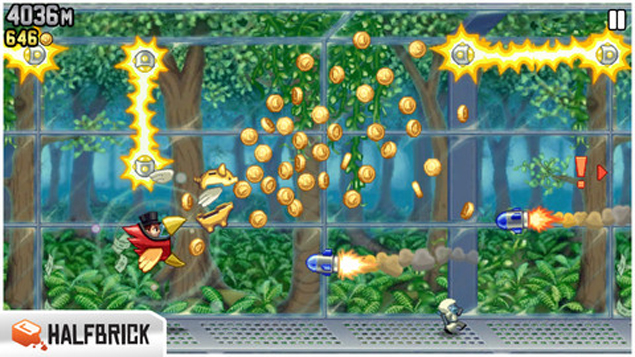 The
game offers many interesting missions like 'high-five 10 scientists in a
run' or 'run 500m without collecting coins' and much more. Completing
three missions in a row takes upgrades Barry's rank, that starts from
'Beginner'.Gamers can collect coins to purchase utilities from 'The
Stash' which includes other jetpacks, snazzy outfits for Barry and can
even stock up on items for later use. Players will get a boost of speed
and power using the Lil' Stomper, Profit Bird and Crazy Freaking
Teleporter, just a selection of the vehicles pickups available, all
playable with one touch controls.
The
game offers many interesting missions like 'high-five 10 scientists in a
run' or 'run 500m without collecting coins' and much more. Completing
three missions in a row takes upgrades Barry's rank, that starts from
'Beginner'.Gamers can collect coins to purchase utilities from 'The
Stash' which includes other jetpacks, snazzy outfits for Barry and can
even stock up on items for later use. Players will get a boost of speed
and power using the Lil' Stomper, Profit Bird and Crazy Freaking
Teleporter, just a selection of the vehicles pickups available, all
playable with one touch controls.
Jetpack Joyride (iOS, Free)
Jetpack Joyride (Google Play, Free)
3. Subway Surfers
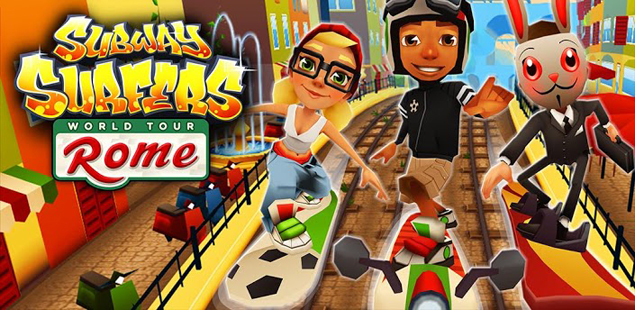
A product of Kiloo Games and Sybo Games, Subway Surfers is based on Jake's running skills on train tracks amidst incoming trains and being chased by the station officer and his police dog. You'll find yourself mostly dodging objects by sliding, jumping and shifting to the sides in vibrant and colourful environments. The game animation gives a very child-like appeal and the music has a hint of naughtiness that doesn't go unnoticed.
Collect shiny gold coins by not just covering the ground, but also somersaulting over train tops to purchase items for one-time use or upgrade power ups like Jetpack, Super Sneakers, Coin Magnet and 2x Multiplier.
 Mystery
boxes at various instances in the game award you with more coins and
extra power-ups just in case you happen to run low. They also give you
articles related to the other characters Tricky and Fresh that will
unlock them. You can complete daily challenges by collecting all letters
of a particular word to earn more coins or complete a mission set of 3
tasks.
Mystery
boxes at various instances in the game award you with more coins and
extra power-ups just in case you happen to run low. They also give you
articles related to the other characters Tricky and Fresh that will
unlock them. You can complete daily challenges by collecting all letters
of a particular word to earn more coins or complete a mission set of 3
tasks.
The app recently got updated with the adventure continuing in Rome, for both iOS and Android and now also includes other goodies like a paint powered jetpack, new hovering boards, an egg hunt (collect 100 eggs for a special prize), Roberto a new Italian scooter kid character and the ability to make your jetpack and other power-ups last even longer with extra power-up upgrades.
Subway Surfers (iOS, Free)
Subway Surfers (Google Play, Free)
4. Rail Rush
Developed by Miniclip.com, Rail Rush is a challenging on-the-move game set in underground mines. Hop in to the cart and start exploring 6 different surroundings amongst caverns, waterfalls, spider nests, dead cities and mushroom halls, tilting and swiping to avoid signals and obstacles on the rail tracks.
You can complete missions such as "Jump up 20 times in a game", "Enter secret level five times" or Die in Dead City 5 times" and level up from a Passer By to Novice and other higher ranks.
Collecting gold nuggets lets you purchase power ups for your cart such as Wood Ram, Super Magnet Force, Iron Grid etc. as well as other characters like Ace Upsleave, Axel Firechief, Charles Longshot and more from the Shop. You can also collect Rock Eggs that offer extra nuggets and other gems to complete your explorer's collection.
The game begins really fast after a certain distance and demands greater focus and presence of mind. The graphics look stunning on both platforms, which also include social networking integration from Facebook and Twitter.
Rail Rush (iOS, Free)
Rail Rush (Google Play, Free)
5. Pitfall
A remastered version of the 1982 classic, Pitfall for iOS and Android follows the adventures of Harry in a volcanic jungle filled with treacherous twists. In this game from Activision, you'll find yourself dodging your way across narrow trenches, dark caverns, and cascading waterfalls, swinging past chasms and whipping away the occasional rattlesnakes, scorpions and crocodiles blocking your path. You must jump and slide to avoid obstacles such as fiery volcanic flames, tumbling ancient artefacts and narrow cliff side pathways.
The game has certain checkpoints marked by the presence of a giant colourful Macaw and a gold bell. You can choose to activate these check points by spending your loot of diamonds collected during the game. You can also use them for power-ups that aid in your running experience. The in-game store also offers added extras like costume changes, potions for extra speed and antidotes for when you're poisoned by the game's snakes and scorpions.
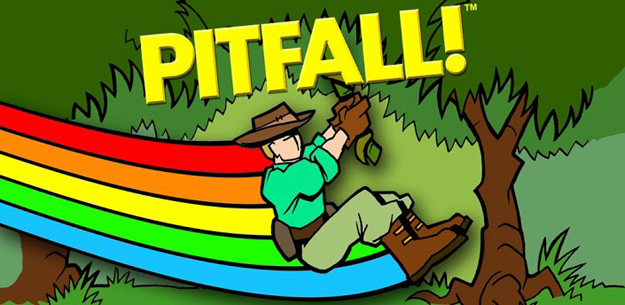 While
running you also come across rare gold tokens that provide you help in
the form of a black Jaguar or a big black Bear to cover a certain
stretch.
While
running you also come across rare gold tokens that provide you help in
the form of a black Jaguar or a big black Bear to cover a certain
stretch.
Though the jungle is just one aspect of it, you'll also be running through villages offering alternate path routes, even under mines riding in a cart over spilled lava and riding a motorcycle in part sequences. Since the paths are very random, you'll always be surprised while playing. Like the other games in the list so far, Pitfall doesn't miss out on social media
Pitfall (iOS, Free)
Pitfall (Google Play, Free)
6. Into The Dead
It's safe to say that everyone loves a zombie game whether it's intense like Dead Trigger and Age of Zombies or light hearted like Plants vs. Zombies. A first-person endless runner game exclusive for iOS from PikPok, Into the Dead let's you experience a grim zombie apocalypse by simply running in the opposite direction. As you'd like a true zombie game to be, Into The Dead offers an intense and visceral zombie-escaping experience in the wilderness with your own breathing sounds occasionally overshadowed by zombie cries.
Eventually you will succumb to the flesh eating zombies, but you're also rewarded for your success with coins. Those coins can be used to pay for perks, which cost little and last just one round. It's easier to survive when you can pay to start with a gun, or to jump ahead 1500m, hold more ammo or find more weapon crates.
Coins can also be used to skip missions or unlock new weapons early. Along with the zombie-slaying Massacre mode, they add some much-needed variety to the game.More powerful weapons unlock as players complete goals like reaching distance and zombie kill milestones. The shotgun has a scatter fire and the chainsaw can slice through multiple zombies.
There is no story, apart from the fact that your chopper crashes and you're invaded by a horde of flesh eating zombies. There is no ending so to say. All you do is continue to run as far as you can engulfed in thick fog and the game keeps you at the edge of your seat. A recent update has brought new Footballer and WWII zombies, kill based scoring and a new map layout.
Into The Dead (iOS, Free)
7. Agent Dash
Here's a game that lets you don the Bond avatar in true style. As the name suggests, you're Agent Dash and your mission is to sprint as far and as fast as you can through a series of dangerous yet gorgeous environments of enemy bases. The game's animation resembles a lot like Disney's art style. The soundtrack is very spy-like and so are the subtle touches like those of footsteps.
Players will find themselves starting each round with jungle surroundings that itself is pretty challenging. It will take more than a while before you can witness other bases such as the lava lair or the town.
Swipe gestures have Dash sidestep, leap and slide beneath incoming obstacles such as laser beams, falling trees, skidding trucks and fiery lava while he also tries to collect stray diamonds, which are used to purchase new gadgets and unlock new agents. Of course, as a free title, those gems can be bought through in-app purchases.
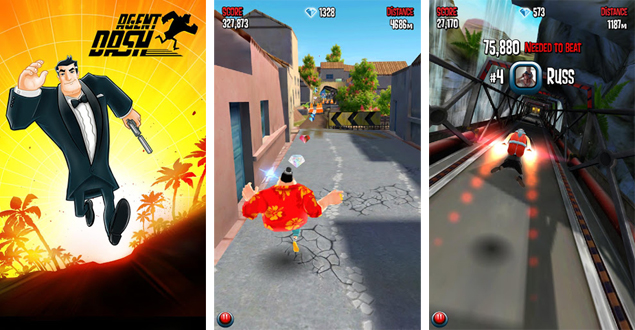 There's
a long list of Objective challenges to complete, each one rewarding
players with an extra percentage multiplier on their score. Tapping
destructible objects has your agent open fire with one of two pistols.
There's
a long list of Objective challenges to complete, each one rewarding
players with an extra percentage multiplier on their score. Tapping
destructible objects has your agent open fire with one of two pistols.
The game offers plenty of spy gadgets to help you on your way like jetpacks, parachutes, magnets and even slow-mo to slow down time. In addition to Agent Dash, players can unlock other runners, including a female agent and some distinctly familiar villains, like one character with an iron jaw and a short fellow with a deadly hat.
Though most of those unlocks are simply new outfits for existing characters, the customisation is taken care off and it's better than dealing with an array of individual items. Facebook integration allows you to connect and compete with friends.
Agent Dash (iOS, Free)
Agent Dash (Google Play, Free)
8. Run Like Hell
The name just says it all. That's the basic aim and once you play Run like Hell, you'll know that it is difficult to keep up. The game is a frantically paced run-and-jump platformer where you'll mostly see yourself sliding, climbing, stringing, jumping and crawling to safety and avoid the clutches of the native hungry tribals coming at you with spears for a juicy spit roast!
The game has three game modes namely endless, story and time-trials set in various environments like ancient ruins, night jungles and beach, village and caverns. Every environment has its own set of obstacles such as boulders, treasure chests, turtle shells on the beach; mad bee hives, anger tribal women in night trails.
While Endless mode can get you running until the tribals catch you, in time trials you can challenge yourself to complete a stage in a stipulated time. Story mode has comic cut scenes as you progress in the storyline.
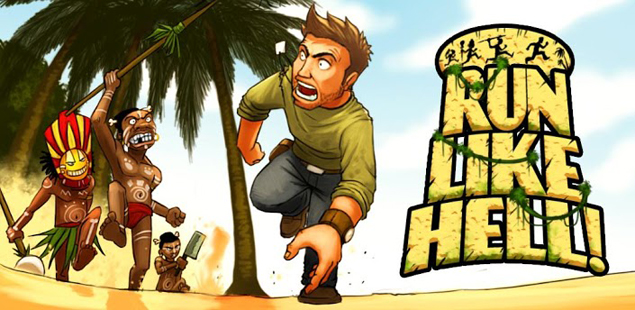 In
case you trip and fall, it will take a few seconds before you pick up
speed again. At various points you can collect fog or thunderbolts to
slow down the tribals along with the letter 'A' connoting Adrenaline,
which boosts your speed should you choose to use it. YOu can spend coins
in the Store to purchase various doses of Adrenaline.
In
case you trip and fall, it will take a few seconds before you pick up
speed again. At various points you can collect fog or thunderbolts to
slow down the tribals along with the letter 'A' connoting Adrenaline,
which boosts your speed should you choose to use it. YOu can spend coins
in the Store to purchase various doses of Adrenaline.
You can also play through the Yeti, Avalanche and Heartbreaker bonus modes. Collecting coins unlocks other levels and additional game modes. Reaching milestones The graphics and gameplay experience for both iOS and Android are really smooth and will keep you hooked for hours.
Run Like Hell (iOS, Free)
Run Like Hell (Google Play, Free)
9.Totem Runner
An iOS exclusive from Chillingo, Totem Runner is one of a kind. You're a warrior trying to secure harmony and happiness to the earth, sowing flowers as you go along. The game has an upbeat soundtrack that ensures you'll be surprised every step of the way.
The initial stage, Waterfalls Valley is a tutorial to get you acquainted with the various kind of totems you'll be using in your journey. Eternal Wind Totem makes you fly with Eagle Wings, which can soar and dodge cliffs and spikes in air.
Nature's Rage Totem transforms you into a boar form to smash obstacles and enemies on the ground. The Dragon's Light Totem is an ancient force you can summon with enough gems that easily gets you through stretches until the next checkpoint arrives. But you'd want to spend them wisely since collecting gems is not all that easy and only after 50 odd gems or so, you'll be awarded with one Dragon Light Totem.
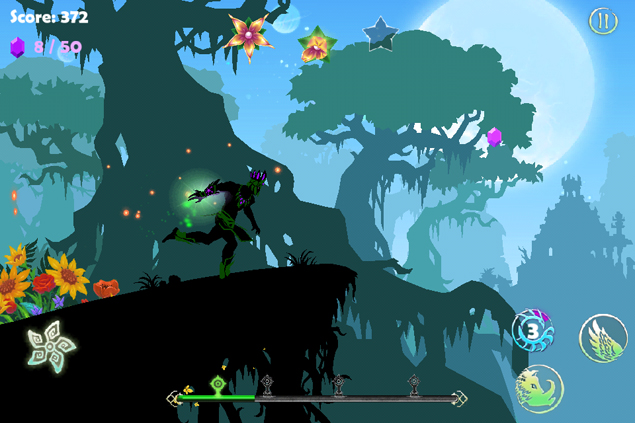 You
need to constantly sow flowers in the earth as you're running that
fills the three stars in each stage and unless you accomplish that,
other episodes in the game won't unlock. While in most levels getting
two stars is still manageable but collecting all three requires great
skill and careful timing. At times, you'll even find yourself memorising
a certain stretch since it will be unknown to you the first time and
the sequence can be very long as well.
You
need to constantly sow flowers in the earth as you're running that
fills the three stars in each stage and unless you accomplish that,
other episodes in the game won't unlock. While in most levels getting
two stars is still manageable but collecting all three requires great
skill and careful timing. At times, you'll even find yourself memorising
a certain stretch since it will be unknown to you the first time and
the sequence can be very long as well.
Mastering the quick switch between one form into human and back, over and over is a real challenge and this comes with a combination of before hand knowledge and quick reflexes. At times you need to swap between bird and boar mid-flight or on the trailing edge of an attack. The difficulty level only increases as you progress.
The graphics of the game differentiate it from the rest in this list offering a very raw experience with each level featuring a vibrant colour scheme and fantastical backdrops -- forests, castles, villages and other strange things. The background layers give a beautiful parallax effect that just can't be ignored.
Totem Runner (iOS, Rs. 55)
10. TheEndApp
Besides offering a perfect end to our list, Goroid Games' TheEndApp employs the basic skill of running for as long as you can. It is a behind-the-back endless runner, with a currency and IAP system and tilt and swipe controls and uses original water effects.
The environs offer a refreshing look with urban hazards, striking looks, light-hearted tone and the damage model it applies. Obstacles along the way include lava pits, cracked cement, jack-knifed trucks and broken car. There are ramps at various points to help you cover longer distances. There are 28 days with 5 challenges each day.
Unlike other games, TheEndApp offers you multiple chances to keep running even if you bump into an obstacle. For instance, if you bang into a car while tilting to pick up a snaking line of duct tape, your screen becomes a shade of crimson for a few seconds. Another differentiating factor that is themed to the game is that while most other games allow you to collect coins or gems, The End App offers duct tape.
You can unlock different characters like Fed the Zombie, Suzy, Yukiko and Bobby with duct tape collections as well as buy PowerUps and other Extras from the Camp. In case you're greedy for additional duct tape, you can Like TheEndApp on Facebook (5000 DT), Follow them on Twitter (for 5000 DT), connect with friends on Facebook (for 10000 DT) and so on.
You can explore different surroundings in three different game mode - The End Origins, The End Pro Zone and The End London Apocalympics. While Origins is free for all, the Pro Zone needs to be bought. However, free users can get a Single Ride Pro Ticket for 10,000 duct tape to gain entry in the Pro Zone without having to purchase the episode separately. The London version is accessible only if you have Pro.
TheEndApp (iOS, Free)
TheEndApp (Google Play, Free)
A more recent category of gaming apps pertaining to non-stop running is catching up fast with games like Temple Run and Jetpack Joyride offering various levels of challenges without compromising on the fun factor. We have put together a list of 10 such endless running game apps that are challenging, addictive and extremely fun. Let's get you running!
1. Temple Run
Developer Imangi Studios had thought this out well from the beginning. Right from day one, Temple Run has been a huge hit amongst the masses for its simple gameplay, missions and the one motive that keeps you hooked: keep running. Your reflexes are put to the ultimate test as you navigate through cliffs and ruins by sliding, jumping, turning and tilting. Collect coins to unlock various character, abilities and power ups that can be put to good use during the game. The iOS app offers social integration with Facebook, Twitter and even lets you Message, Mail or save your scores to camera roll.
The
game's popularity knew no leaps and bounds and Imangi cashed in on the
opportunity to release two spin-offs in association with Disney namely
Temple Run: Brave and the more recent Temple Run: Oz along with a
recently introduced sequel to the original hit. Temple Run 2 offers tons
of new gameplay features and story lines offering more diverse and
stunning environments with the introduction of new traps and hurdles
along the way. The game now also has new characters, more power-ups,
special achievements, better gameplay graphics and this time round a
bigger monkey chasing you down the structures.Temple Run (iOS, Free)
Temple Run (Google Play, Free)
2. Jetpack Joyride
The adventures of Barry Steakfries are never-ending. Jetpack Joyride is the brainchild of HalfBrick Studios, immensely popular for their creations such as Fruit Ninja, Fruit Ninja: Puss in Boots, Age of Zombies and another running game called Monster Dash. Jetpack Joyride features the adventures of Barry Steakfries, a disgruntled bureaucrat who breaks in to a secret laboratory and runs amok dodging dangerous objects like zappers, lasers, electricity fields and even guided missiles. Barry is equipped with a jetpack powered by machine gun propulsions to begin with, that help him on his missions.
The
game offers many interesting missions like 'high-five 10 scientists in a
run' or 'run 500m without collecting coins' and much more. Completing
three missions in a row takes upgrades Barry's rank, that starts from
'Beginner'.Gamers can collect coins to purchase utilities from 'The
Stash' which includes other jetpacks, snazzy outfits for Barry and can
even stock up on items for later use. Players will get a boost of speed
and power using the Lil' Stomper, Profit Bird and Crazy Freaking
Teleporter, just a selection of the vehicles pickups available, all
playable with one touch controls.Jetpack Joyride (iOS, Free)
Jetpack Joyride (Google Play, Free)
3. Subway Surfers
A product of Kiloo Games and Sybo Games, Subway Surfers is based on Jake's running skills on train tracks amidst incoming trains and being chased by the station officer and his police dog. You'll find yourself mostly dodging objects by sliding, jumping and shifting to the sides in vibrant and colourful environments. The game animation gives a very child-like appeal and the music has a hint of naughtiness that doesn't go unnoticed.
Collect shiny gold coins by not just covering the ground, but also somersaulting over train tops to purchase items for one-time use or upgrade power ups like Jetpack, Super Sneakers, Coin Magnet and 2x Multiplier.
Mystery
boxes at various instances in the game award you with more coins and
extra power-ups just in case you happen to run low. They also give you
articles related to the other characters Tricky and Fresh that will
unlock them. You can complete daily challenges by collecting all letters
of a particular word to earn more coins or complete a mission set of 3
tasks. The app recently got updated with the adventure continuing in Rome, for both iOS and Android and now also includes other goodies like a paint powered jetpack, new hovering boards, an egg hunt (collect 100 eggs for a special prize), Roberto a new Italian scooter kid character and the ability to make your jetpack and other power-ups last even longer with extra power-up upgrades.
Subway Surfers (iOS, Free)
Subway Surfers (Google Play, Free)
4. Rail Rush
Developed by Miniclip.com, Rail Rush is a challenging on-the-move game set in underground mines. Hop in to the cart and start exploring 6 different surroundings amongst caverns, waterfalls, spider nests, dead cities and mushroom halls, tilting and swiping to avoid signals and obstacles on the rail tracks.
You can complete missions such as "Jump up 20 times in a game", "Enter secret level five times" or Die in Dead City 5 times" and level up from a Passer By to Novice and other higher ranks.
Collecting gold nuggets lets you purchase power ups for your cart such as Wood Ram, Super Magnet Force, Iron Grid etc. as well as other characters like Ace Upsleave, Axel Firechief, Charles Longshot and more from the Shop. You can also collect Rock Eggs that offer extra nuggets and other gems to complete your explorer's collection.
The game begins really fast after a certain distance and demands greater focus and presence of mind. The graphics look stunning on both platforms, which also include social networking integration from Facebook and Twitter.
Rail Rush (iOS, Free)
Rail Rush (Google Play, Free)
5. Pitfall
A remastered version of the 1982 classic, Pitfall for iOS and Android follows the adventures of Harry in a volcanic jungle filled with treacherous twists. In this game from Activision, you'll find yourself dodging your way across narrow trenches, dark caverns, and cascading waterfalls, swinging past chasms and whipping away the occasional rattlesnakes, scorpions and crocodiles blocking your path. You must jump and slide to avoid obstacles such as fiery volcanic flames, tumbling ancient artefacts and narrow cliff side pathways.
The game has certain checkpoints marked by the presence of a giant colourful Macaw and a gold bell. You can choose to activate these check points by spending your loot of diamonds collected during the game. You can also use them for power-ups that aid in your running experience. The in-game store also offers added extras like costume changes, potions for extra speed and antidotes for when you're poisoned by the game's snakes and scorpions.
While
running you also come across rare gold tokens that provide you help in
the form of a black Jaguar or a big black Bear to cover a certain
stretch.Though the jungle is just one aspect of it, you'll also be running through villages offering alternate path routes, even under mines riding in a cart over spilled lava and riding a motorcycle in part sequences. Since the paths are very random, you'll always be surprised while playing. Like the other games in the list so far, Pitfall doesn't miss out on social media
Pitfall (iOS, Free)
Pitfall (Google Play, Free)
6. Into The Dead
It's safe to say that everyone loves a zombie game whether it's intense like Dead Trigger and Age of Zombies or light hearted like Plants vs. Zombies. A first-person endless runner game exclusive for iOS from PikPok, Into the Dead let's you experience a grim zombie apocalypse by simply running in the opposite direction. As you'd like a true zombie game to be, Into The Dead offers an intense and visceral zombie-escaping experience in the wilderness with your own breathing sounds occasionally overshadowed by zombie cries.
Eventually you will succumb to the flesh eating zombies, but you're also rewarded for your success with coins. Those coins can be used to pay for perks, which cost little and last just one round. It's easier to survive when you can pay to start with a gun, or to jump ahead 1500m, hold more ammo or find more weapon crates.
Coins can also be used to skip missions or unlock new weapons early. Along with the zombie-slaying Massacre mode, they add some much-needed variety to the game.More powerful weapons unlock as players complete goals like reaching distance and zombie kill milestones. The shotgun has a scatter fire and the chainsaw can slice through multiple zombies.
There is no story, apart from the fact that your chopper crashes and you're invaded by a horde of flesh eating zombies. There is no ending so to say. All you do is continue to run as far as you can engulfed in thick fog and the game keeps you at the edge of your seat. A recent update has brought new Footballer and WWII zombies, kill based scoring and a new map layout.
Into The Dead (iOS, Free)
7. Agent Dash
Here's a game that lets you don the Bond avatar in true style. As the name suggests, you're Agent Dash and your mission is to sprint as far and as fast as you can through a series of dangerous yet gorgeous environments of enemy bases. The game's animation resembles a lot like Disney's art style. The soundtrack is very spy-like and so are the subtle touches like those of footsteps.
Players will find themselves starting each round with jungle surroundings that itself is pretty challenging. It will take more than a while before you can witness other bases such as the lava lair or the town.
Swipe gestures have Dash sidestep, leap and slide beneath incoming obstacles such as laser beams, falling trees, skidding trucks and fiery lava while he also tries to collect stray diamonds, which are used to purchase new gadgets and unlock new agents. Of course, as a free title, those gems can be bought through in-app purchases.
There's
a long list of Objective challenges to complete, each one rewarding
players with an extra percentage multiplier on their score. Tapping
destructible objects has your agent open fire with one of two pistols.The game offers plenty of spy gadgets to help you on your way like jetpacks, parachutes, magnets and even slow-mo to slow down time. In addition to Agent Dash, players can unlock other runners, including a female agent and some distinctly familiar villains, like one character with an iron jaw and a short fellow with a deadly hat.
Though most of those unlocks are simply new outfits for existing characters, the customisation is taken care off and it's better than dealing with an array of individual items. Facebook integration allows you to connect and compete with friends.
Agent Dash (iOS, Free)
Agent Dash (Google Play, Free)
8. Run Like Hell
The name just says it all. That's the basic aim and once you play Run like Hell, you'll know that it is difficult to keep up. The game is a frantically paced run-and-jump platformer where you'll mostly see yourself sliding, climbing, stringing, jumping and crawling to safety and avoid the clutches of the native hungry tribals coming at you with spears for a juicy spit roast!
The game has three game modes namely endless, story and time-trials set in various environments like ancient ruins, night jungles and beach, village and caverns. Every environment has its own set of obstacles such as boulders, treasure chests, turtle shells on the beach; mad bee hives, anger tribal women in night trails.
While Endless mode can get you running until the tribals catch you, in time trials you can challenge yourself to complete a stage in a stipulated time. Story mode has comic cut scenes as you progress in the storyline.
In
case you trip and fall, it will take a few seconds before you pick up
speed again. At various points you can collect fog or thunderbolts to
slow down the tribals along with the letter 'A' connoting Adrenaline,
which boosts your speed should you choose to use it. YOu can spend coins
in the Store to purchase various doses of Adrenaline.You can also play through the Yeti, Avalanche and Heartbreaker bonus modes. Collecting coins unlocks other levels and additional game modes. Reaching milestones The graphics and gameplay experience for both iOS and Android are really smooth and will keep you hooked for hours.
Run Like Hell (iOS, Free)
Run Like Hell (Google Play, Free)
9.Totem Runner
An iOS exclusive from Chillingo, Totem Runner is one of a kind. You're a warrior trying to secure harmony and happiness to the earth, sowing flowers as you go along. The game has an upbeat soundtrack that ensures you'll be surprised every step of the way.
The initial stage, Waterfalls Valley is a tutorial to get you acquainted with the various kind of totems you'll be using in your journey. Eternal Wind Totem makes you fly with Eagle Wings, which can soar and dodge cliffs and spikes in air.
Nature's Rage Totem transforms you into a boar form to smash obstacles and enemies on the ground. The Dragon's Light Totem is an ancient force you can summon with enough gems that easily gets you through stretches until the next checkpoint arrives. But you'd want to spend them wisely since collecting gems is not all that easy and only after 50 odd gems or so, you'll be awarded with one Dragon Light Totem.
You
need to constantly sow flowers in the earth as you're running that
fills the three stars in each stage and unless you accomplish that,
other episodes in the game won't unlock. While in most levels getting
two stars is still manageable but collecting all three requires great
skill and careful timing. At times, you'll even find yourself memorising
a certain stretch since it will be unknown to you the first time and
the sequence can be very long as well.Mastering the quick switch between one form into human and back, over and over is a real challenge and this comes with a combination of before hand knowledge and quick reflexes. At times you need to swap between bird and boar mid-flight or on the trailing edge of an attack. The difficulty level only increases as you progress.
The graphics of the game differentiate it from the rest in this list offering a very raw experience with each level featuring a vibrant colour scheme and fantastical backdrops -- forests, castles, villages and other strange things. The background layers give a beautiful parallax effect that just can't be ignored.
Totem Runner (iOS, Rs. 55)
10. TheEndApp
Besides offering a perfect end to our list, Goroid Games' TheEndApp employs the basic skill of running for as long as you can. It is a behind-the-back endless runner, with a currency and IAP system and tilt and swipe controls and uses original water effects.
The environs offer a refreshing look with urban hazards, striking looks, light-hearted tone and the damage model it applies. Obstacles along the way include lava pits, cracked cement, jack-knifed trucks and broken car. There are ramps at various points to help you cover longer distances. There are 28 days with 5 challenges each day.
Unlike other games, TheEndApp offers you multiple chances to keep running even if you bump into an obstacle. For instance, if you bang into a car while tilting to pick up a snaking line of duct tape, your screen becomes a shade of crimson for a few seconds. Another differentiating factor that is themed to the game is that while most other games allow you to collect coins or gems, The End App offers duct tape.
You can unlock different characters like Fed the Zombie, Suzy, Yukiko and Bobby with duct tape collections as well as buy PowerUps and other Extras from the Camp. In case you're greedy for additional duct tape, you can Like TheEndApp on Facebook (5000 DT), Follow them on Twitter (for 5000 DT), connect with friends on Facebook (for 10000 DT) and so on.
You can explore different surroundings in three different game mode - The End Origins, The End Pro Zone and The End London Apocalympics. While Origins is free for all, the Pro Zone needs to be bought. However, free users can get a Single Ride Pro Ticket for 10,000 duct tape to gain entry in the Pro Zone without having to purchase the episode separately. The London version is accessible only if you have Pro.
TheEndApp (iOS, Free)
TheEndApp (Google Play, Free)


 .
.